A row of modern silver golf carts parked on stone pavers outside a resort clubhouse at golden hour.

For golf courses and resorts

Get CartReady today.

Maintenance software for golf carts, shuttles and resort vehicles.

Live demo: no sign-up, fictional data. Free 90-day pilot: up to about 50 vehicles, no card.

See how it works

Know what's running. Know what's broken. Know what it's costing you.

Start every busy day knowing which carts are ready, get problems reported with a QR scan, and see where your repair money goes.

Golf carts, shuttles and utility vehicles, organized by department. Works with any brand.

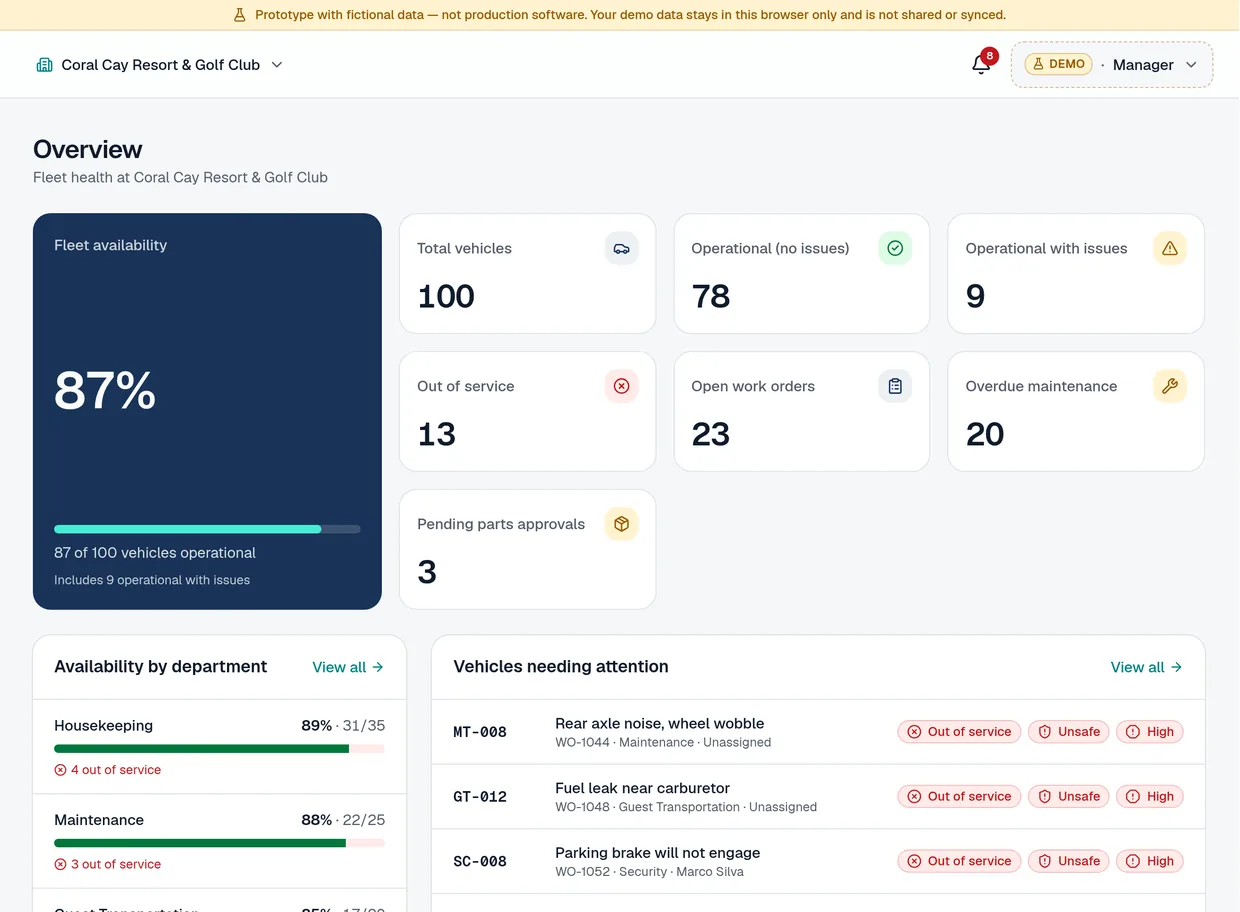
Demo manager Overview: fleet availability, vehicle counts by status, open work orders, overdue maintenance, pending parts approvals, availability by department and the vehicles needing attention.
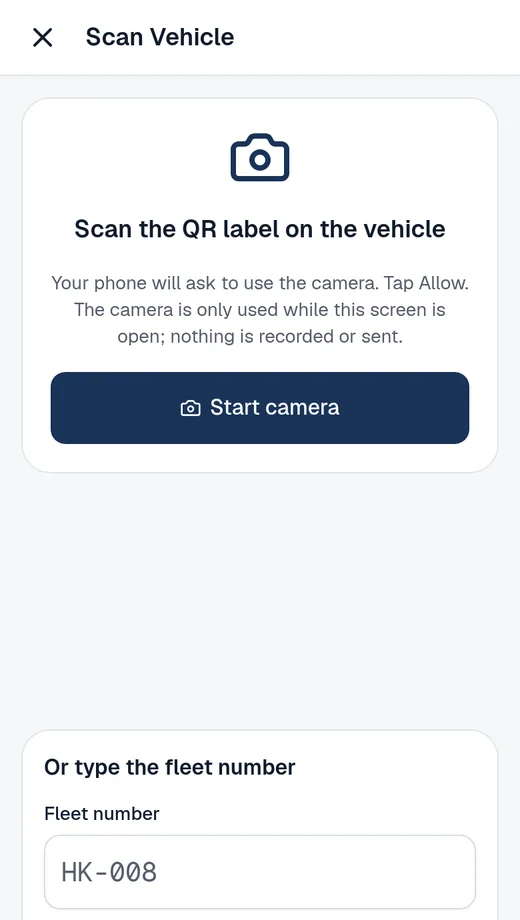
Demo mechanic screen on a phone: Scan Vehicle, scan the QR label on the vehicle or type the fleet number.
Real demo screens · fictional data

How it works

From a scan to back in service

Six steps, shown in the real demo with fictional data.

  1. Step 1

    Techs scan the vehicle

    Anyone on the team scans the QR label on the cart with their phone's camera, or types the fleet number. No app store.

    Demo phone screen: Scan Vehicle, with Start camera and a fleet number field.
    See it in the live demo
  2. Step 2

    Report the issue

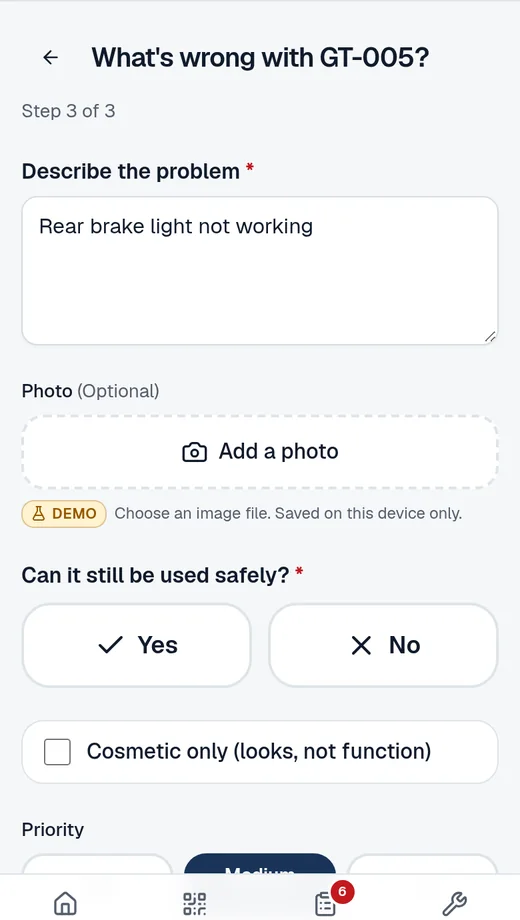
    A short form: describe the problem, add a photo if it helps, and say whether the vehicle can still be used safely. Then send.

    Demo phone screen: What's wrong with GT-005, with a description, an Add a photo button and the question Can it still be used safely.
    See it in the live demo
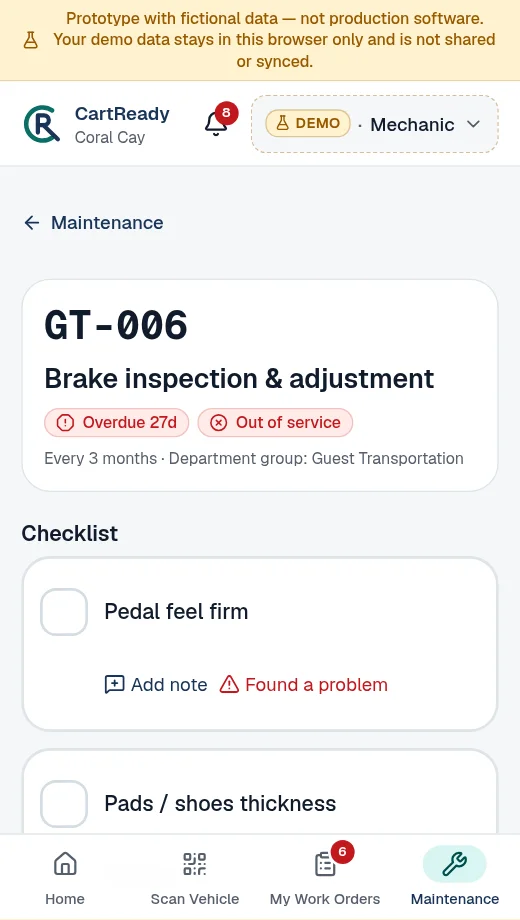
  3. Demo phone screen: Brake inspection and adjustment checklist for GT-006, marked Overdue and Out of service, with checklist items and a Found a problem link on each.

    Scheduled checks, too: calendar checklists for each vehicle, with due and overdue flags. Found a problem during a check? Report it from the checklist.

  4. Step 3

    Assign the work

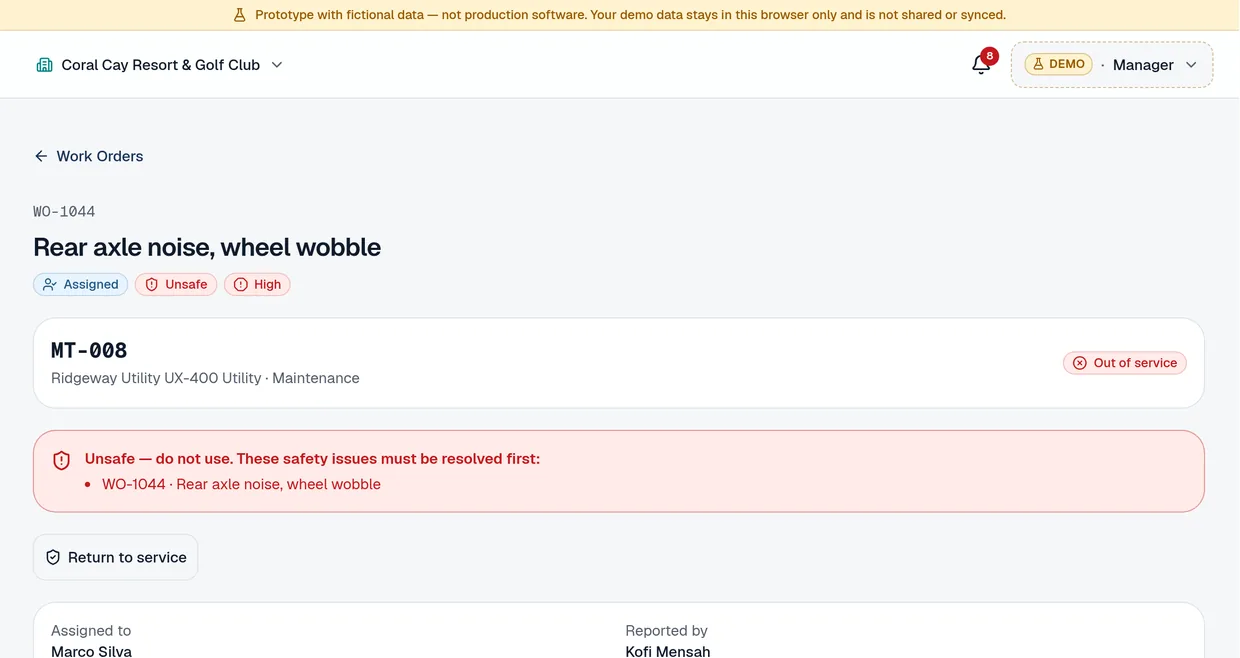
    The report becomes a work order automatically. A manager assigns it to a mechanic, or a mechanic takes it from the unassigned queue, and the priority can be changed. A vehicle reported unsafe stays out of service.

    Demo work order WO-1044, Rear axle noise, wheel wobble, on vehicle MT-008: Assigned to Marco Silva, Unsafe, High priority, out of service.
    See it in the live demo
  5. Step 4

    Approve parts

    Mechanics request parts from the job. Managers approve or reject each request, then track it through ordered and received.

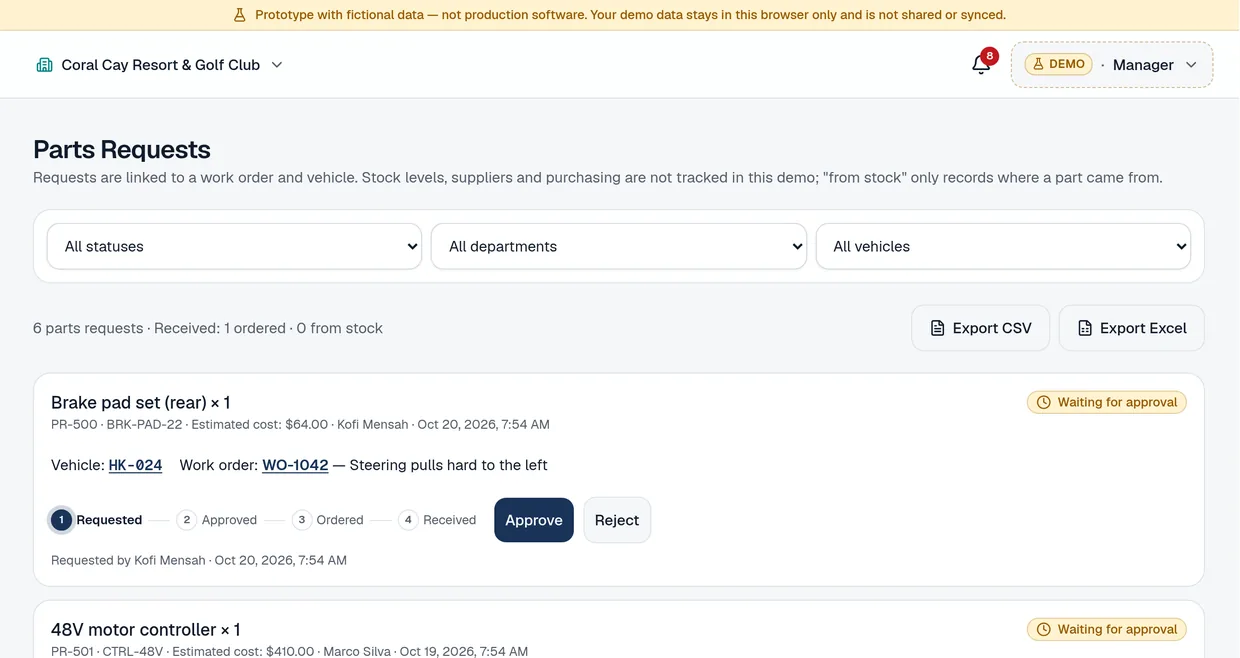
    Demo Parts Requests list: parts waiting for approval, each linked to a vehicle and work order, with a Requested, Approved, Ordered, Received stepper and Approve and Reject buttons.
    See it in the live demo
  6. Step 5

    Track costs

    Recorded parts and labor roll up by vehicle, department or month. Costs that weren't entered show as "Not recorded", never as zero.

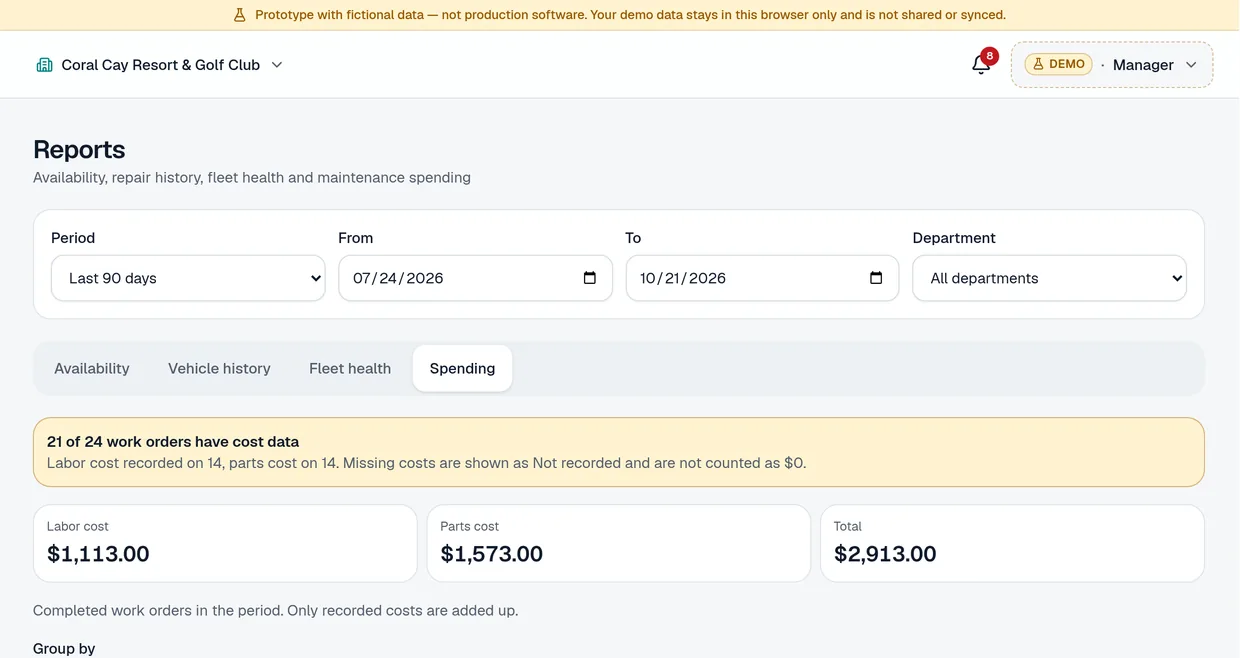
    Demo Reports, Spending tab: labor, parts and total cost from recorded costs, grouped by vehicle, with CSV and Excel export.
    See it in the live demo
  7. Step 6

    Back in service

    When the repair is done, someone taps Return to service and confirms it's safe. Fleet availability updates for everyone.

    Demo Overview: fleet availability, availability by department and the vehicles needing attention.
    See it in the live demo

Why it matters

Know where your repair money goes

What the numbers say, and how your repair records help.

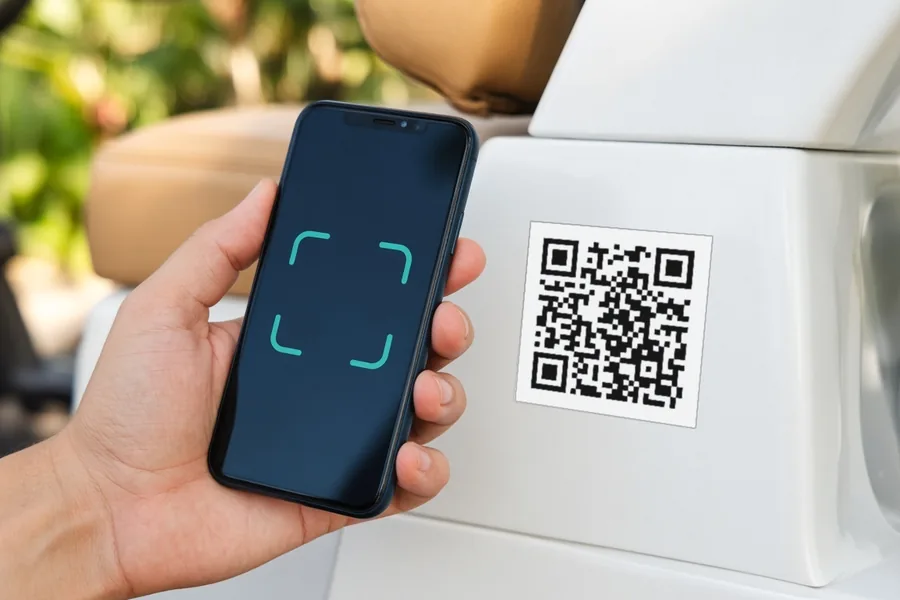
A hand holding a phone up to the QR label on the side of a golf cart to report a problem.
  • Plan next year's budget from real numbers.

    Every repair's recorded parts and labor stays on each cart's record. Budget season starts from what your fleet actually cost, and which carts cost the most.

    Demo Reports, Spending tab, grouped by vehicle, highest total first: MT-012 $999.00, HK-025 $708.00, HK-003 $700.00, MT-015 $325.00, GT-001 $314.00.
    Spending by cart, highest first. Demo, fictional data.
  • 30%1

    Fleet rule of thumb: review a vehicle for replacement when maintenance cost reaches 30% of its residual value.

    Know when to stop investing

    One common fleet guideline is to assess a vehicle for replacement when its maintenance cost reaches 30% or more of its residual value.1 It's a rule of thumb, not a standard, and it only works if you know what each vehicle has cost you.

    CartReady keeps every recorded repair cost on each cart's record and ranks vehicles by repair count, with recorded cost beside each, so you can compare the cost with what the cart is worth.

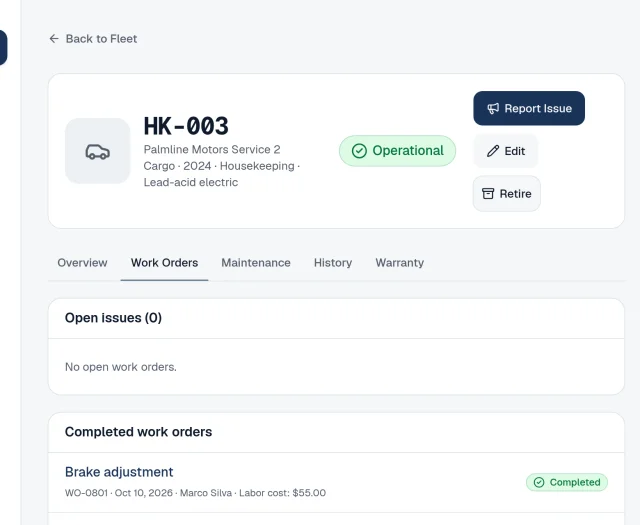
    Demo vehicle record for cart HK-003, an operational 2024 cargo cart, on the Work Orders tab: no open issues and the first completed repair, a brake adjustment on Oct 10, 2026 by Marco Silva with a $55.00 labor cost.
    One cart's record: every repair and its recorded cost. Demo, fictional data.
  • $10k–$20k2

    Average yearly spend on renting extra carts for big outings

    Have enough carts on busy days

    At many golf courses, large outings already need more carts than the course owns, with extra rentals averaging $10,000–$20,000 a year.2

    Don't add to it with carts waiting on a repair. See before the first tee time which vehicles are ready.

    A row of white golf carts with QR labels lined up outside a clubhouse on a bright morning, while an attendant checks a phone.
  • See every cart that's out of service

    How long it's been out, and what it's waiting on: a mechanic, a part or a safety check.

  • Keep preventive maintenance on schedule

    Set calendar checklists for each vehicle, and see which ones are due or overdue. Replacement becomes a decision you make with each cart's record in front of you.

Sources

  1. Sal Bibona, “How to Calculate Optimal Replacement Cycles”, Automotive Fleet (January 13, 2015). A fleet consultant’s rule of thumb for fleet vehicles; not an industry standard.
  2. Adam Moeller, “Golf Carts – Profit Center or Not?”, USGA Green Section Record, Vol. 52 (7) (April 4, 2014).

Why we built it

CartReady started from years of working with resort purchasing and management teams and watching them track entire fleets on Excel spreadsheets. We built the tool we kept wishing they had.

Free pilot

Try it with your own fleet, free

  • 90-day free pilot. No card required and no automatic billing.
  • Up to about 50 vehicles. Start with the carts that matter most on a busy day.
  • Your data, your call. When the pilot ends, we export your data to you or delete it.

How it works: we reply within one business day, you send your fleet list (CSV or Excel template), we set up your pilot and email you, then you print a QR label for each cart and your team starts reporting.

Or try the live demo first.

We'll follow up within one business day. All fields are required unless marked optional. We store only what you type here; see our privacy notice.

FAQ

Is the demo a real account?

No. It's a working prototype with fictional data that stays in your browser. Nothing you enter in the demo is sent to us.

What vehicles does it cover?

Golf carts, utility vehicles and shuttles. LSVs and other property vehicles are tracked the same way. Not mowers or turf equipment. It works with any brand.

What does "know what it's costing you" mean?

Recorded parts and labor costs only, per vehicle and in total. No fuel or charging, depreciation, leases, insurance or total cost of ownership.

Does it calculate what downtime costs?

No. It shows how long vehicles are out of service, as time, not dollars.

How does it handle unsafe vehicles?

A vehicle reported as unsafe stays out of service until the issue is repaired and confirmed safe. The app tracks the process; your team makes the safety call.

Do technicians need an app store?

No. It runs in the phone's web browser and needs an internet connection.

Can I bring my spreadsheet?

Yes: upload it as CSV or Excel using our template, with a preview, validation and undo.

How much does it cost?

The pilot is free. Pricing after launch isn't set yet; ask us when you request a pilot.

GPS, telematics or accounting integrations?

Not today.

What happens to our data?

During a pilot it's used only to run CartReady for you. At the end we export it to you or delete it, your choice.

See it for yourself. No sign-up.

The live demo uses fictional data.